Piano Pop
- 4.3
- Rating
- 50.00K
- Installs
- Free
- Price
 Analysis by App-foxy
Piano Pop is a free music game from MWM - AI Music and Creative Apps that turns piano playing into a quick, colorful timing challenge. I approached it expecting something closer to a casual rhythm toy than a serious piano-learning tool, and that distinction matters. Its appeal is the immediate feeling of matching notes and keeping a song moving, not building a complete understanding of the keyboard.
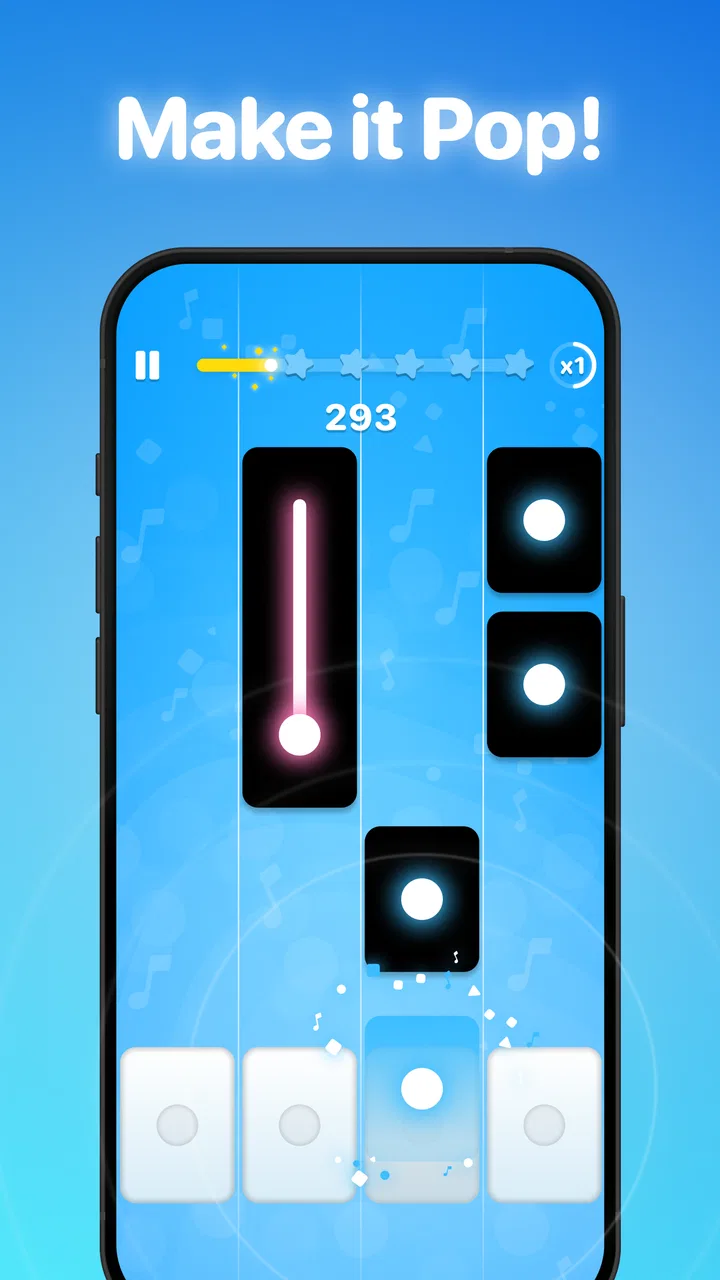
The central idea is simple: follow the musical prompts, tap with the rhythm, and try to make the performance feel smooth. That narrow focus is also the game’s strongest quality. I can open it when I have only a few spare minutes, understand what it wants almost immediately, and get into a musical flow without first studying a complicated menu or lesson plan. The real value is its low-friction rhythm practice, not its ability to replace a piano teacher or a full instrument app.
It is listed as a free game in the music category, with an Everyone age rating, so it is easy to imagine using it as a light family-friendly diversion. The game has an average rating of 4.3 from around 300 ratings, and it has passed 50 thousand installs. Those figures suggest a modest but clearly interested audience rather than a massive rhythm-game community.
You May Also Like

 Pandora - Music & Podcasts
Pandora’s Music Is Easy to Start, but Harder to Recover
Pandora’s strength is its low-effort path from a seed to a station. Its weak spot is how much confidence it asks you to place in connection, setup, and quiet recovery.

 AccuWeather: Weather Radar
AccuWeather Review: A Quick, Clear Forecast for Everyday Decisions
For everyday plans, the best forecast is the one you can understand quickly. AccuWeather makes rain timing, radar, and local conditions easy to act on, with a few trade-offs.

 Hill Climb Racing
Why Hill Climb Racing Still Turns Crashes Into One More Run
A tiny car, a bumpy hill and one more upgrade: Hill Climb Racing keeps resurfacing because its simple chaos makes every near-miss feel personal.

 AliExpress - Shopping App
AliExpress Makes Global Shopping Feel Personal, but Shoppers Bear the Risk
AliExpress turns a global marketplace into a pocket-sized discovery engine. Its reach is useful, its shopping loop compelling, and its trade-offs easy to miss.

 Lords Mobile: Kingdom Wars
Lords Mobile Is a Kingdom-Building Routine, Not a Quick Match
A case-by-case verdict on the building, battles, device demands, and social commitments that make Lords Mobile rewarding for some players and exhausting for others.

 PDF Scanner app - TapScanner
TapScanner Makes Paperwork Easier to Capture, Check, and Share
TapScanner makes scanning with a phone feel less like a rescue operation and more like a dependable step in getting work done. Its capture tools are useful, though not flawless.
More From Our News Desk
View All News


Why the piano-timing idea works so well
Many music games make the player think about several things at once: lanes, combos, avatars, unlock systems, or increasingly complex rules. Piano Pop feels more approachable because its musical identity is immediately recognizable. The piano format gives each successful input a satisfying purpose. I am not merely pressing a button to score points; I am trying to keep a melody alive.
That difference changes the mood of a session. A traditional piano-learning app usually asks for patience, repetition, and attention to technique. A rhythm game asks for reaction speed. This title sits closer to the second group, but the piano presentation makes the activity feel more expressive than a generic tapping challenge. For a player who enjoys music but does not own a keyboard, that can be enough to make short sessions feel rewarding.
I also like that the concept does not demand a large time commitment. It works best when I treat it as a small musical break: a few attempts while waiting, a quick challenge after work, or a casual game to share with someone who is curious about piano-style play. The design is easier to approach than a conventional music-production app because there is no need to understand tracks, recording, effects, or notation before starting.
At the same time, the focused design sets a clear boundary. If your goal is to learn finger independence, read sheet music, understand chords, or develop proper hand position, this is not the right primary tool. The game may strengthen attention to timing, but that is only one part of becoming a pianist. I would use it as an entertaining supplement, never as a substitute for structured instruction.
What the short sessions feel like
In practice, the best moments come when I stop treating each note as an isolated tap and start following the musical phrase. Early attempts are usually about understanding the visual rhythm and avoiding mistakes. Once the pattern becomes familiar, the challenge shifts toward consistency. That creates a pleasant progression within a session, even without turning the experience into formal practice.
One useful habit is to resist tapping faster simply because the next prompt appears. I get better results when I watch slightly ahead of the current note and keep my hands relaxed. This is a small but important distinction: the game rewards anticipation more than frantic reaction. Players who concentrate only on the note directly under their finger may find themselves constantly catching up.
Another practical tip is to play with a stable grip and a clean screen. Since the experience depends on timing, accidental touches and awkward hand placement can make a run feel harder than it really is. I prefer holding the phone securely and using one consistent tapping position rather than shifting my hand after every mistake. That makes the challenge feel more like a rhythm exercise and less like wrestling with the device.
The piano presentation also makes the game suitable for people who are intimidated by real instruments. A physical keyboard can look demanding, especially to someone who does not know where to begin. Here, the first step is simply responding to what appears on screen. That removes the fear of pressing the wrong real-world key and lets a beginner focus on musical timing.
A realistic everyday use case
My favorite use case is a short evening session when I want something more active than scrolling but less demanding than a full game. I can play for a few minutes, focus on a melody, and stop without feeling that I have abandoned a long campaign. That makes Piano Pop particularly suitable for small gaps in the day, such as waiting for an appointment or taking a break between tasks.
It can also work as an introduction for a child or a friend who says they like piano music but has never tried a musical game. The Everyone rating supports that broad accessibility, although younger players may still need normal supervision around screen time and purchases. I would present it as a playful way to explore rhythm, not as a lesson that guarantees musical progress.
A more interesting use is as a warm-up before other music activities. I would not expect it to teach scales or technique, but a few minutes of attentive tapping can help me switch from a distracted state into a listening-focused one. For someone preparing to practice an actual instrument, that mental transition may be more useful than the game’s score itself.
There is also a social angle, even if the core activity is personal. Passing the phone to another player and comparing who can keep a sequence going can create a quick, friendly challenge. The game’s simplicity helps here because a new player does not need a long explanation. The trade-off is that people who want deep multiplayer competition or a large online ranking scene may find the experience too limited.
Where it differs from ordinary piano apps
The usual alternative is a piano-learning app that displays a keyboard, teaches notes, and builds lessons around repetition. That kind of app is better when the user wants measurable musical foundations. Piano Pop is better when the user wants immediate play. It removes much of the theory and turns the piano into the language of a rhythm game.
Compared with a digital piano simulator, it is also more directed. A simulator may let me explore keys freely, but it can feel empty if I do not already know what to play. Piano Pop gives me a reason to tap and a timing problem to solve. The cost of that direction is freedom: I am following the game’s structure rather than improvising or experimenting with my own melodies.
Rhythm games built around drums, electronic tracks, or multiple lanes may offer more visual intensity and a stronger arcade identity. The piano theme gives this title a gentler entry point, but players seeking spectacle may prefer a more elaborate alternative. I see Piano Pop as the option for someone who wants music at the center without committing to a large, complicated game system.
It is also worth separating it from music-creation apps. Those tools are designed around composing, recording, arranging, or manipulating sound. This game is about performing prompts accurately. If I want to make a song, I would choose a creative workstation; if I want a quick interactive musical challenge, this is the more suitable direction.
The practical cost of a free game
The game is free to download, which makes trying it easy. However, in-app purchases range from $3.99 to $44.99 per item, so I would be careful before handing the phone to a child or leaving payment settings unrestricted. The presence of optional purchases does not automatically make the game unsuitable, but it does mean that “free” should be understood as free entry rather than a promise that every part of the experience has no cost.
For me, the sensible approach is to play the opening experience first and decide whether the basic loop is enjoyable before considering anything extra. A purchase cannot fix a mismatch between the player and the core timing mechanic. If the tapping itself does not feel satisfying, adding content will not change that fundamental reaction.
The current version is 2.00.00, and the game requires Android 7.0 or later. That requirement covers a wide range of older Android devices, although rhythm games can still feel different depending on screen responsiveness and general device performance. For the cleanest timing, I would close demanding background apps, avoid playing while the phone is struggling, and use the same device consistently when trying to improve.
Sound is another practical consideration. Playing with audio makes the musical timing easier to understand, but public spaces may require headphones or muted play. If I remove the sound completely, the visual prompts become more important and the experience may feel less musical. This is a game I enjoy more when I can actually listen, so it is not ideal for every waiting-room situation.
Small techniques that improve the experience
The first technique I recommend is learning the rhythm of a section rather than chasing a perfect result immediately. After a failed attempt, I try to identify whether the problem was rushing, hesitating, or losing my place visually. That turns repetition into useful feedback. Without this approach, it is easy to keep tapping randomly and blame the difficulty when the real issue is inconsistent attention.
The second is to use shorter, deliberate sessions instead of playing until frustration takes over. Rhythm games can make one more attempt feel irresistible, but tired hands and divided attention usually lead to worse timing. I get more from the game when I stop after a good run or take a short break after several mistakes. This is especially helpful for younger players, who may interpret a missed sequence as a reason to tap harder and faster.
The third is to treat the visual track as a guide, not the entire musical experience. I listen for the pulse and use the screen to confirm where I am. That habit makes the game feel less mechanical and can help anyone who wants to become more comfortable responding to rhythm. It is a modest benefit, but more meaningful than simply collecting successful taps without listening.
A fourth insight is that the game’s simplicity can make it a useful test of what kind of music app you actually want. If I enjoy following a melody but want more freedom, I may be ready for a piano simulator or a beginner keyboard course. If I prefer the quick feedback and do not care about theory, then this game is probably closer to my needs. In that sense, it can serve as a low-risk introduction to the wider world of music apps.
Who will enjoy it most
I think the strongest audience is casual players who like music-themed games and want a clear objective from the first session. It is also a good fit for beginners who are curious about piano but feel uncomfortable starting with lessons. The game’s accessible format removes the pressure of knowing terminology or owning an instrument.
Parents may appreciate the broad age rating and straightforward concept, but I would still pay attention to purchase controls and play duration. The game can be a nice shared activity when an adult plays alongside a child and talks about keeping a steady rhythm. It is less suitable as an unsupervised replacement for a musical education plan.
Existing pianists may enjoy it as a change of pace, especially when they want a quick reaction challenge rather than serious practice. Still, experienced players should not expect the game to reflect real keyboard technique. The skills overlap mainly in timing and musical attention, not in posture, fingering, or expressive control.
I would skip it if I need deep customization, composition tools, detailed lessons, or a substantial competitive system. I would also skip it if I dislike repeating short musical patterns or if I want a game with a large adventure structure. Piano Pop is intentionally narrower than those alternatives, and that narrowness will feel refreshing to some people but restrictive to others.
My recommendation after using it
What I like most about Piano Pop is that it understands its role. It does not need to pretend to be a complete piano course to be enjoyable. By concentrating on the connection between a visual prompt, a tap, and a musical beat, it offers a clean little activity that is easy to start and easy to explain.
Its weaknesses come from the same decision. Players looking for depth may outgrow the central loop, and anyone expecting genuine instrument training should choose a dedicated learning app instead. The free entry is welcome, but the in-app purchase range means I would approach extras carefully and judge the basic experience on its own merits.
For a friend who wants a lightweight music game, I would recommend trying it. I would describe it honestly as a piano-themed rhythm experience: useful for sharpening attention to timing, pleasant for short breaks, and approachable for complete beginners. I would not recommend it as the only path toward learning piano, but as a compact way to make a few spare minutes feel musical, it does its job well.
MWM - AI Music and Creative Apps has kept the concept focused enough to remain accessible, and the result is most convincing when I play without demanding more from it than it is designed to provide. If the idea of matching piano prompts sounds satisfying, the free download makes experimentation simple. If you want freedom to compose or a structured course, your time and money will be better spent elsewhere.
FAQs for Piano Pop
01What is Piano Pop, and how does the game work?
Piano Pop is a casual rhythm game built around tapping musical tiles in time with the song. Notes move across the screen, and you must tap them accurately without missing or pressing the wrong area. As you improve, songs become faster and more demanding. The game is easy to understand, making it suitable for short sessions, while its increasing difficulty gives experienced players a reason to keep practicing.
02Can I play Piano Pop without an internet connection?
Piano Pop may allow some gameplay features to work offline, but the exact experience can depend on the version installed and the device being used. Basic songs or previously available content may remain accessible without a connection, while advertisements, online rankings, updates, cloud features, or additional music may require internet access. It is best to open the game once online before traveling or playing without mobile data.
03Is Piano Pop free to download and play?
Piano Pop is generally available as a free download, allowing users to try the core gameplay without paying upfront. However, free versions of rhythm games commonly include advertisements, optional purchases, or paid content such as extra songs, lives, bonuses, or ad removal. Before downloading, check the store listing and in-app purchase information, especially if children will use the device or purchases are not restricted.
04Does Piano Pop contain many songs and support different music styles?
The available music selection can vary according to the app version, region, updates, and licensing arrangements. Piano Pop typically focuses on recognizable melodies and fast, accessible rhythm challenges rather than functioning as a complete music library. Some tracks or modes may unlock through progress, rewards, or optional purchases. Players who want a specific song should review the current in-game catalog before committing to the download.
05What devices and permissions are required to play Piano Pop?
Piano Pop is designed for modern Android and iOS devices with a touchscreen, and performance is usually best on phones or tablets with updated operating systems. The game may request internet access for advertisements, analytics, updates, or online services, while notification or storage permissions can depend on the platform and version. Review permissions during installation and avoid downloading unofficial versions from unknown sources.
Pros
- Simple tap controls make it easy for beginners to start playing.
- Fast-paced songs provide an engaging challenge for rhythm game fans.
- Bright visuals and musical feedback make sessions feel lively.
- Short rounds are convenient for quick gaming breaks.
- A broad song selection helps keep the gameplay from feeling repetitive.
Cons
- Increasing speed can make later levels frustrating for casual players.
- Some songs or features may require in-app purchases to unlock.
- Gameplay depends heavily on accurate timing and touch response.
- Frequent play can feel repetitive if you prefer varied game mechanics.
- Ads may interrupt the experience
- especially in the free version.

Piano Pop
Gallery